2018年3月10日 星期六
HTML5 div 標籤顯示與關閉控制
<div id="TableauViewDiv" class="col-sm-12" align="center" style="display: none">
</div>
<script>
function TableauView_HideShow() {
var x = document.getElementById("TableauViewDiv");
if (x.style.display === "none") {
x.style.display = "block";
} else {
x.style.display = "none";
}
}
說明:
直接在Div裡控制
關閉:<div id="1" style="display: none"></div>
顯示:<div id="1" style="display: block"></div>
在 JavaScript 裡控制
關閉:document.getElementById("TableauViewDiv").style.display = "none";
顯示:document.getElementById("TableauViewDiv").style.display = "block";

JavaScript 等待函示執行完畢,才執行下一個動作
只要在函式裡新增 async: false, 即可
function PostTicket() {
var tmp = '';
$.ajax({
type: "POST",
async: false,
url: "./Default.aspx/Get..........3m",
contentType: "application/json; charset=utf-8",
dataType: "json",
//data: JSON.stringify(), //資料後傳欄位
success: function (response) {
tmp = JSON.parse(response.d);
console.log('PostTicket_OK:' + tmp);
},
failure: function (response) {
alert(response.status + ' ' + response.statusText);
},
error: function (response) {
alert(response.status + ' ' + response.statusText);
}
});
return tmp; //回傳 Ticket 值
}
function PostTicket() {
var tmp = '';
$.ajax({
type: "POST",
async: false,
url: "./Default.aspx/Get..........3m",
contentType: "application/json; charset=utf-8",
dataType: "json",
//data: JSON.stringify(), //資料後傳欄位
success: function (response) {
tmp = JSON.parse(response.d);
console.log('PostTicket_OK:' + tmp);
},
failure: function (response) {
alert(response.status + ' ' + response.statusText);
},
error: function (response) {
alert(response.status + ' ' + response.statusText);
}
});
return tmp; //回傳 Ticket 值
}
HTML5 a 標籤 沒有手指的指標出現新增 href 假資訊
如下所示:
<a class="list-group-item" type="button" href="javascript: return false;" onclick="ShowTableauView(\'' + temp_SubMenuName + '\')">' + temp_SubMenuName + '</a>';
<a class="list-group-item" type="button" href="javascript: return false;" onclick="ShowTableauView(\'' + temp_SubMenuName + '\')">' + temp_SubMenuName + '</a>';
如果 iframe 無法內嵌網頁,則另開網頁分頁來顯示
HTML5 裡有使用 iframe 嵌入網頁,但會顯示空白,表示該網頁有判斷不能被別的網頁嵌入
範例如下:
<iframe id="TableauView" width="90%" height="1024" ></iframe>
可以在 script 裡 判斷如果是外部網頁,則開啟新分頁顯示
<script>
function ViewUrl() {
window.open(SubMenuUrl[i]);
}
範例如下:
<iframe id="TableauView" width="90%" height="1024" ></iframe>
可以在 script 裡 判斷如果是外部網頁,則開啟新分頁顯示
<script>
function ViewUrl() {
window.open(SubMenuUrl[i]);
}
ASP.NET 有 Site.Master 主頁時,新增子網頁
ASP.NET 有 Site.Master 主頁時,新增子網頁,有以下幾點要注意:
1.建議由 Default.aspx 複製出一個副本,再改名稱。
.aspx 內第一行要改
<%@ Page Title="Home Page" Language="C#" MasterPageFile="~/Site.Master" AutoEventWireup="true" CodeBehind="DefaultInt.aspx.cs" Inherits="IR.DefaultInt" %>
.aspx.cs 內的 class 名稱要改
namespace IR
{
public partial class DefaultInt : Page
如果發生已修改好的網頁不能用,記得更新 bin 檔到遠端 IIS 主機
1.建議由 Default.aspx 複製出一個副本,再改名稱。
.aspx 內第一行要改
<%@ Page Title="Home Page" Language="C#" MasterPageFile="~/Site.Master" AutoEventWireup="true" CodeBehind="DefaultInt.aspx.cs" Inherits="IR.DefaultInt" %>
.aspx.cs 內的 class 名稱要改
namespace IR
{
public partial class DefaultInt : Page
如果發生已修改好的網頁不能用,記得更新 bin 檔到遠端 IIS 主機
2018年3月9日 星期五
Add Trusted IP Addresses or Host Names to Tableau Server
打開命令視窗,用admin權限執行
切換到目錄 C:\Program Files\Tableau\Tableau Server\10.5\bin).
輸入下面指令停止 Tableau Server:
tabadmin stop
下一步,輸入下列命令:
tabadmin set wgserver.trusted_hosts "<trusted IP addresses or host names>"
In the command above, <trusted IP addresses> should be a comma-separated list of the IPv4 addresses or host names of your web server(s).
Note: The values you specify completely overwrite any previous setting. Therefore, you must include the full list of hosts in the set command. (You cannot amend the list of hosts by running the set command repeatedly.)
範例:
tabadmin set wgserver.trusted_hosts "192.168.1.101, 192.168.1.102, 192.168.1.103"
或
tabadmin set wgserver.trusted_hosts "webserv1, webserv2, webserv3"
Notes:
The comma separated list should be in quotes, with one space after each comma.
The web servers you specify must use static IP addresses, even if you use host names (learn more).
If you have one or more proxy servers between the computer that is requesting the trusted ticket (one of those configured in step 2, above) and Tableau Server, you also need to add them as trusted gateways. See Configure a reverse proxy server for steps.
輸入下面指令變更設定檔的資料:
tabadmin config
最後再輸入下面指令啟動 Tableau Server:
tabadmin start
PS:如果等很久,建議把 Tableau Server 主機重開後再重跑上面步驟就可以了!^_^
切換到目錄 C:\Program Files\Tableau\Tableau Server\10.5\bin).
輸入下面指令停止 Tableau Server:
tabadmin stop
下一步,輸入下列命令:
tabadmin set wgserver.trusted_hosts "<trusted IP addresses or host names>"
In the command above, <trusted IP addresses> should be a comma-separated list of the IPv4 addresses or host names of your web server(s).
Note: The values you specify completely overwrite any previous setting. Therefore, you must include the full list of hosts in the set command. (You cannot amend the list of hosts by running the set command repeatedly.)
範例:
tabadmin set wgserver.trusted_hosts "192.168.1.101, 192.168.1.102, 192.168.1.103"
或
tabadmin set wgserver.trusted_hosts "webserv1, webserv2, webserv3"
Notes:
The comma separated list should be in quotes, with one space after each comma.
The web servers you specify must use static IP addresses, even if you use host names (learn more).
If you have one or more proxy servers between the computer that is requesting the trusted ticket (one of those configured in step 2, above) and Tableau Server, you also need to add them as trusted gateways. See Configure a reverse proxy server for steps.
輸入下面指令變更設定檔的資料:
tabadmin config
最後再輸入下面指令啟動 Tableau Server:
tabadmin start
PS:如果等很久,建議把 Tableau Server 主機重開後再重跑上面步驟就可以了!^_^
2017年12月6日 星期三
備忘:簡易弄懂 MYSQL 的 JOIN用法 (LEFT JOIN , RIGHT JOIN 使用時機)
參考資料來源:http://blog.webgolds.com/view/189
table2
接下來就來測試inner join囉!!
Syntax
看看得到的結果:
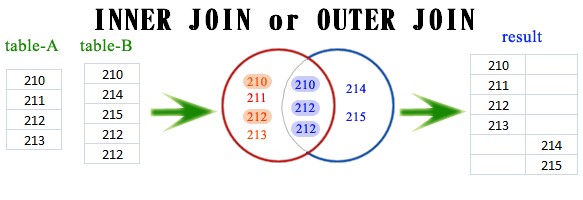
接下來換LEFT JOIN囉!
Syntax
看看得到的結果:
結果說明:
Left join是以A表的記錄為基礎的,A可以看成左表,B可以看成右表,left join是以左表為準的.
換句話說,左表(A)的記錄將會全部表示出來,而右表(B)只會顯示符合搜索條件的記錄(例子中為: A.aID = B.bID).
B表記錄不足的地方均為NULL.
那麼RIGHT JOIN會是如何呢?
Syntax
看看得到的結果:
哇,可以看到跟LEFT的情況倒過來了呢。
另外,很多人都不知道JOIN裡面USING 跟 ON 的差異在哪裡?
以我們剛剛第一個例子來說:
所以其實也可以寫成這樣喔:
對於inner join, outer join , left join , right join還是很模糊嗎?
沒關係,這邊提供最簡易的SQL版本,
輕鬆好上手。
首先,我們先建立2個資料表,分別是table1跟table2。
table1
沒關係,這邊提供最簡易的SQL版本,
輕鬆好上手。
首先,我們先建立2個資料表,分別是table1跟table2。
table1
| id |
| 210 |
| 211 |
| 212 |
| 213 |
CREATE TABLE `table1` (
`id` int(11) NOT NULL
) ENGINE=MyISAM DEFAULT CHARSET=utf8;
INSERT INTO `table1` (`id`) VALUES
(210),
(211),
(212),
(213);
-- 2016-02-09 23:16:25
`id` int(11) NOT NULL
) ENGINE=MyISAM DEFAULT CHARSET=utf8;
INSERT INTO `table1` (`id`) VALUES
(210),
(211),
(212),
(213);
-- 2016-02-09 23:16:25
table2
| id |
| 210 |
| 214 |
| 215 |
| 212 |
| 212 |
CREATE TABLE `table2` (
`id` int(11) NOT NULL
) ENGINE=MyISAM DEFAULT CHARSET=utf8;
#台灣金站
INSERT INTO `table2` (`id`) VALUES
(210),
(214),
(215),
(212),
(212);
-- 2016-02-09 23:17:01
`id` int(11) NOT NULL
) ENGINE=MyISAM DEFAULT CHARSET=utf8;
#台灣金站
INSERT INTO `table2` (`id`) VALUES
(210),
(214),
(215),
(212),
(212);
-- 2016-02-09 23:17:01
接下來就來測試inner join囉!!
Syntax
SELECT a.id, b.id
FROM table1 as a
INNER JOIN table2 as b
ON a.id= b.id
FROM table1 as a
INNER JOIN table2 as b
ON a.id= b.id
看看得到的結果:
| id | id |
| 210 | 210 |
| 212 | 212 |
| 212 | 212 |

接下來換LEFT JOIN囉!
Syntax
SELECT a.id, b.id
FROM table1 as a
LEFT JOIN table2 as b
ON a.id= b.id
FROM table1 as a
LEFT JOIN table2 as b
ON a.id= b.id
看看得到的結果:
| a.id | b.id |
| 210 | 210 |
| 211 | null |
| 212 | 212 |
| 212 | 212 |
| 213 | null |
結果說明:
Left join是以A表的記錄為基礎的,A可以看成左表,B可以看成右表,left join是以左表為準的.
換句話說,左表(A)的記錄將會全部表示出來,而右表(B)只會顯示符合搜索條件的記錄(例子中為: A.aID = B.bID).
B表記錄不足的地方均為NULL.
那麼RIGHT JOIN會是如何呢?
Syntax
SELECT a.id, b.id
FROM table1 as a
RIGHT JOIN table2 as b
ON a.id= b.id
FROM table1 as a
RIGHT JOIN table2 as b
ON a.id= b.id
看看得到的結果:
| a.id | b.id |
| 210 | 210 |
| null | 214 |
| null | 215 |
| 212 | 212 |
| 212 | 212 |
哇,可以看到跟LEFT的情況倒過來了呢。
另外,很多人都不知道JOIN裡面USING 跟 ON 的差異在哪裡?
以我們剛剛第一個例子來說:
#範例 B-1
SELECT a.id, b.id
FROM table1 as a
INNER JOIN table2 as b
ON a.id= b.id
由於我們的欄位都是共同為ID這個名稱(two tables share a column of the exact same name ),SELECT a.id, b.id
FROM table1 as a
INNER JOIN table2 as b
ON a.id= b.id
所以其實也可以寫成這樣喔:
#範例 B-2
SELECT a.id, b.id
FROM table1 as a
INNER JOIN table2 as b
USING (id)
範例 B-1跟範例 B-2 執行結果都會得到一樣。SELECT a.id, b.id
FROM table1 as a
INNER JOIN table2 as b
USING (id)
訂閱:
文章 (Atom)
-
Google API: https://console.developers.google.com/apis/library?project=arms-165901 fusion tables 欄位設定 Activity ~number ,Text (活動編號/文字) ...
-
還原 Adventure Works 2014 sample database 到 SQL Server 2016 evaluation(180天)試用版。[環境為windows 10] 分享來源: Code-Programming
-
 一、先去安裝,CnetOS CentOS Project: https://www.centos.org/ 選擇下面按鈕進入下載頁面 選擇下面按鈕下載ISO光碟影像檔 106.05.10 最新的影像檔是: http://isoredirect.centos.o...
